Google 推出的开放协议,让不同框架、不同厂商的 AI Agent 能够互相通信与协作,堪称 AI Agent 世界的 HTTP。
核心概念 Link to heading
2025 是单 Agent 之年,2026 是多 Agent 之年。当多个 Agent 需要协同工作时,一个标准化的通信协议必不可少。A2A(Agent-to-Agent Protocol)应运而生。
A2A vs MCP Link to heading
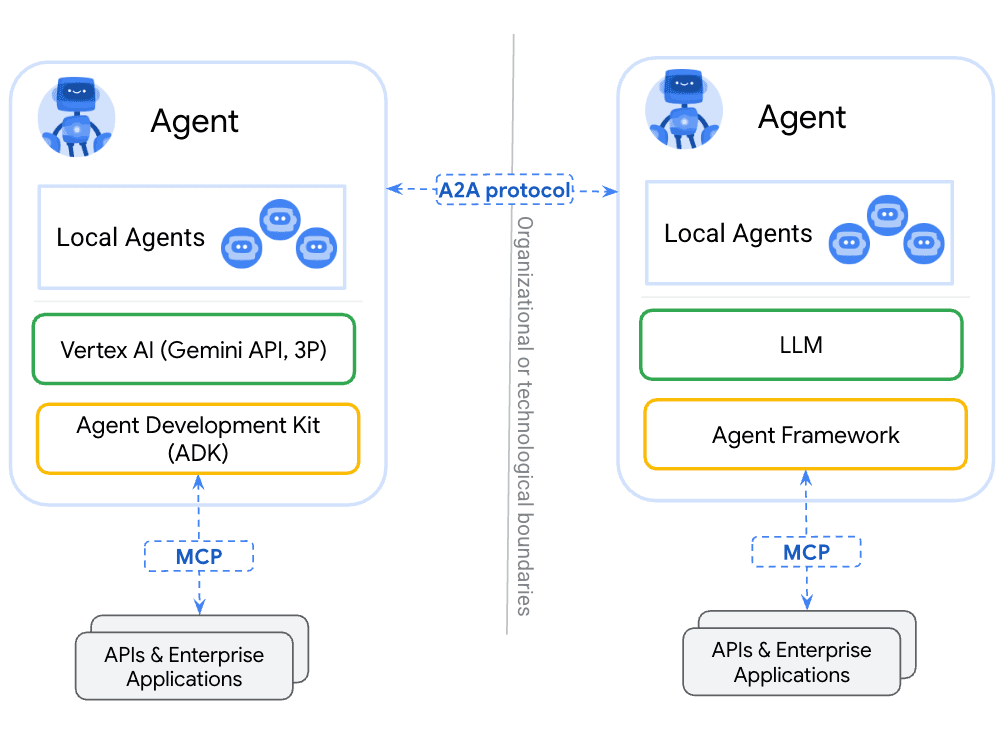
理解 A2A 最快的方式是把它和已经普及的 MCP 对照:
| 维度 | MCP | A2A |
|---|---|---|
| 连接对象 | Agent ↔ 工具/数据源 | Agent ↔ Agent |
| 通信模型 | 同步请求-响应 | 同步 + 异步流式 |
| 典型场景 | Agent 调用搜索、数据库、API | 旅行 Agent 向酒店 Agent 发起预订 |
| 协议基础 | JSON-RPC | JSON-RPC 2.0 over HTTP |
一句话:MCP 让 Agent 使用工具,A2A 让 Agent 之间对话。
三个关键抽象 Link to heading
Agent Card — 每个 A2A Agent 的"名片",JSON 格式文档,声明了:
- 支持的技能(skills)
- 认证方式
- 通信端点 URL
- 支持的传输模式(同步/流式/异步)
其他 Agent 通过读取这张名片,就知道如何与它交互。
Task — A2A 中的基本工作单元。Client 向 Server 提交一个 Task,Server 执行并返回结果。Task 有明确的生命周期:submitted → working → completed/failed。
Message — Agent 之间的实际通信内容,包含文本、结构化数据或文件附件。
通信流程 Link to heading
安装 SDK Link to heading
A2A 官方提供了 Python 和 TypeScript 两种语言的 SDK:
# Python
pip install a2a-sdk

# TypeScript/Node.js
npm install @a2a-js/sdk
实际使用 Link to heading
第一步:实现 Server 端 Agent Link to heading
创建一个提供天气查询能力的 Agent Server:
from a2a.server import Server
from a2a.types import AgentCard, Skill, Task

class WeatherAgent:
    def __init__(self):
        self.card = AgentCard(
            name="Weather Agent",
            skills=[
                Skill(
                    id="get_weather",
                    name="查询天气",
                    description="返回指定城市的天气信息"
                )
            ],
            # 支持的传输模式
            supports_streaming=True,
        )

    async def execute(self, task: Task) -> Task:
        city = task.input.get("city")
        # 实际逻辑:调用天气 API
        result = f"{city}:晴,25°C"
        task.output = {"text": result}
        task.status = "completed"
        return task

server = Server(WeatherAgent())
server.run(port=9999)
启动后,其他 Agent 访问 http://localhost:9999/.well-known/agent.json 就能看到这张 Agent Card。
第二步:Client Agent 调用 Link to heading
另一个 Agent(比如旅行规划 Agent)需要查询天气时:
from a2a.client import A2AClient

# 通过 Agent Card 发现并连接
client = A2AClient("http://localhost:9999")

# 提交任务
task = await client.send_task({
    "skill": "get_weather",
    "input": {"city": "北京"}
})

print(task.output)
# 输出:北京:晴,25°C
第三步:处理异步长任务 Link to heading
对于耗时较长的任务,A2A 支持流式推送:
# 订阅任务状态更新
await client.subscribe(task_id="task-123")

# 通过 SSE 接收实时进度
async for event in client.stream_events():
    print(f"状态: {event.status}")
    # 状态: working
    # 状态: working (partial result...)
    # 状态: completed
适用场景 Link to heading
A2A 最适合以下场景:
- 企业内多 Agent 协作:HR Agent、财务 Agent、IT Agent 各自独立,通过 A2A 串联流程
- 跨平台 Agent 互操作:用 LangChain 构建的 Agent 与用 AutoGen 构建的 Agent 通信
- Agent 能力发现与编排:动态发现可用的 Agent 技能,按需组合
官方链接 Link to heading
[2] https://github.com/a2aproject/A2A
[3] https://developers.googleblog.com/en/a2a-a-new-era-of-agent-interoperability/
[4] https://developers.googleblog.com/developers-guide-to-ai-agent-protocols/
Signature Link to heading
本文由 AI 生成,不保证正确,仅作参考